RiLiFi
Start free

RiLiFi limits: plans, characters and file sizes

Every limit in RiLiFi is listed here. The first table shows what changes by plan. The rest apply on every plan: characters, file sizes, counts, names and PINs, and how long a session stays open. The last table shows what you and your audience see when a limit is reached.

By the RiLiFi teamUpdated 10 min read

Limits by plan

LimitBy planHow it counts
People per sessionFree 100 · Creator 500 · Pro 1,000 · Enterprise 5,000+People in one live session at the same time. Read from the folder owner's plan. Someone already in the room can always rejoin.
Saved activitiesFree 15 · Creator 500 · Pro unlimited · Enterprise unlimitedPresentations, quizzes, polls, word clouds, Q&As and spin wheels, counted together. Deleted items do not count.
Live sessionsFree 50 · Creator 500 · Pro unlimited · Enterprise unlimitedA total for the life of the account, not per month. A session counts when you start it. Rehearsals and test spins do not count. Restarting a wheel starts a new session.
FoldersFree 3 · Creator 50 · Pro unlimited · Enterprise unlimitedDeleting a folder deletes everything in it and frees a place.
People per folderFree 1 · Creator 5 · Pro 10 · Enterprise unlimitedPeople you can share each folder with. Sharing is view only.
BookmarksFree 50 · Creator 500 · Pro unlimited · Enterprise unlimitedSaved web links inside folders, counted against the folder owner's plan.
AI credits a monthFree 10 · Creator 50 · Pro 200 · Enterprise 200 per licenseReset each calendar month. Only requests that work use credits.
Report exportsFree no · Creator yes · Pro yes · Enterprise yesCSV files from every report, and the PNG picture of a word cloud.
Named resultsFree no · Creator yes · Pro yes · Enterprise yesEach person's answers in a report, such as a quiz player's answers or who joined a poll.
Q&A Review firstFree no · Creator yes · Pro yes · Enterprise yesHold each question until you approve it. Free Q&As run on Auto-approve.
Phone remoteFree no · Creator yes · Pro yes · Enterprise yesRun a presentation, quiz, poll or word cloud from your phone.
Brand kitFree no · Creator yes · Pro yes · Enterprise yesYour colours and logo on presentations.
Engagement insightsFree no · Creator no · Pro no · Enterprise yesCross-event and team comparisons.
Login onlyFree no · Creator no · Pro no · Enterprise yesPresentation audiences give a name and email and confirm a 6-digit code. The report lists who was verified.
OrganizationFree no · Creator no · Pro no · Enterprise yesTeam licenses, members and admins. See organizations.

Note:Enterprise rooms are not capped at a fixed number: plan for 5,000+ people, and talk to us about very large events. See pricing for every plan.

AI credit costs

Failed, refused and cancelled requests are free. See AI credits for how to check your balance.

RequestCreditsNotes
One activity from a topic1A quiz, poll, word cloud, Q&A or wheel from your description.
One activity from a PDF or photos2The file is read in your browser.
Plan a session5With or without an agenda file.
A presentation5Also when added to a planned session, on top of its 5.
Improve one question or slide1In the quiz editor or the presentation studio.
Rewrite a whole quiz or deck5
Redo (Make another)0Up to 5 redos per request. A failed redo does not use one up.

Quiz limits

Full settings are in Live quiz.

ItemLimitNotes
Quiz title3 to 100 characters
DescriptionUp to 500 characters
QuestionUp to 250 characters
Answers2 to 8 per question, up to 200 characters eachTick at least one correct answer before Go live.
Questions per quizNo fixed limitAI writes up to 20 in one request.
Time to answer5 to 999 secondsPresets 10s, 20s, 30s and 60s. Default 30 seconds.
Points for a correct answerAny whole number from 0Presets 0, 10, 20 and 50. Speed bonus adds up to 1,000.
PicturesJPEG, PNG or WebP, up to 300 per quizRiLiFi shrinks the photo in your browser. The saved file can be up to 2 MB and 4096 px.

Poll limits

ItemLimitNotes
Poll name3 to 100 characters
DescriptionUp to 1,025 characters
Question5 to 250 characters
OptionsAt least 2, up to 100 characters eachNo maximum number of options.
Timer15 to 999 secondsOr No timer, the default.

Word cloud limits

ItemLimitNotes
NameUp to 120 characters
DescriptionUp to 1,000 characters
PromptUp to 255 charactersNeeded before Go live.
Words per person1 to 10Default 1.
Answer lengthShort 25 characters, Long 150Long answers are split into words.
Sends30 a minute per person
Timer15 to 999 secondsOr No timer, the default.

Q&A limits

ItemLimitNotes
Name and descriptionUp to 120 and 1,000 characters
QuestionUp to 200 characters
Wait between questions15 seconds per person
Questions per person1 to 10Default 3. Deleted questions still count.
UpvotesOne per questionAn upvote can go on, off and on again. After that it can only come off. Nobody can upvote their own question.
NamesUp to 50 charactersA name already in use is refused.

Spin wheel limits

ItemLimitNotes
Wheel title3 to 25 characters
DescriptionUp to 1,025 characters
OptionsAt least 2, up to 100 characters eachNo maximum number. Under 50 characters fits best. Labels show on the wheel up to 30 options.
Spin time1 to 600 secondsPresets 5s, 10s, 15s and 30s.

Presentation limits

See Create an interactive presentation for every slide type.

ItemLimitNotes
Slides per deckUp to 10013 slide types.
Title and descriptionUp to 150 and 1,000 charactersIn the create dialog.
Speaker notesUp to 5,000 characters per slide
Slide textHeading 150, body 2,000, question 255 charactersAnswers and list items up to 120 characters.
Options on a slidePoll, rating scale and ranking up to 10; quiz up to 6At least 2. Wheel slides take up to 1,000 items of 60 characters.
PicturesJPEG, PNG or WebP, up to 300 per deckShrunk in your browser first. The saved file can be up to 2 MB and 4096 px.
PDF importUp to 50 MBEach page becomes a picture slide, up to the room left in the deck.
Quiz slide timer5 to 120 secondsDefault 20 seconds.
Open text slide50 to 500 characters per answerDefault 200. Up to 3 answers per person.
Word cloud slide1 to 10 words per person, 25 characters each
Q&A on a slideUp to 280 characters per question5 questions a minute per person.
AI presentationAims for 8 to 12 slides, never more than 205 credits.

AI input limits

Nothing is saved until you press create. See Generate with AI.

InputLimitNotes
Topic for one activity3 to 500 charactersFor a quiz, pick 5, 10, 15 or 20 questions. Default 10.
Plan a session description3 to 800 charactersThe same for an AI presentation.
PDFOne file up to 10 MBNeeds at least 200 characters of text. RiLiFi reads the first 30 pages. For a scanned PDF, use photos.
PhotosUp to 3, JPEG, PNG or WebP, up to 10 MB eachMade smaller in your browser before they are sent.
Wheel from AI2 to 30 options
Session planRun order of up to 8 stepsSaved in the folder description.

Folders and bookmarks

ItemLimitNotes
Folder name3 to 25 charactersYour Private folder cannot be renamed, shared or deleted.
Folder descriptionUp to 1,025 characters
Bookmark title3 to 100 characters
Bookmark descriptionUp to 255 characters
Bookmark addressA full web addressIt needs a domain ending, like .com.

People joining, PINs and session time

See Joining a session for how people join.

ItemLimitNotes
Names1 to 50 charactersLetters, numbers, spaces and ' - . _ only. No emoji. A quiz swaps a duplicate name for a random one; word clouds and Q&A refuse it.
PIN6 charactersTwo digits, then 4 letters or digits. PINs never use 0, O, 1, I or L.
PIN start11 poll, 22 quiz, 44 word cloud, 55 Q&A, 66 presentationSpin wheels have no PIN. They run on the big screen only.
Session closesAfter 3 hours with no activity, or 24 hours after it startsSelf-paced presentations stay open for up to 7 days.
Rehearse room12, 30, 120 or 500 pretend peopleDefault 30. Rehearsals save nothing and use no sessions.

Account and support limits

ItemLimitNotes
Full name2 to 50 charactersLetters, numbers, spaces and ' . -
Email addressUp to 254 charactersThrowaway email domains are refused.
Password8 to 128 charactersNeeds an upper case letter, a lower case letter, a number and a symbol.
Email codes6 digits, valid for 10 minutes5 wrong tries end a code. Resend after 60 seconds, up to 5 codes an hour.
Wrong passwords10 in a rowSign-in pauses for 15 minutes, longer each time, up to 24 hours.
BioUp to 500 characters
Support caseTitle 3 to 200, details 10 to 2,000 charactersText only, no attachments.
Licenses per purchaseUp to 99 of each planOrganizations only.

What happens at a limit

LimitWhat you seeWhat to do
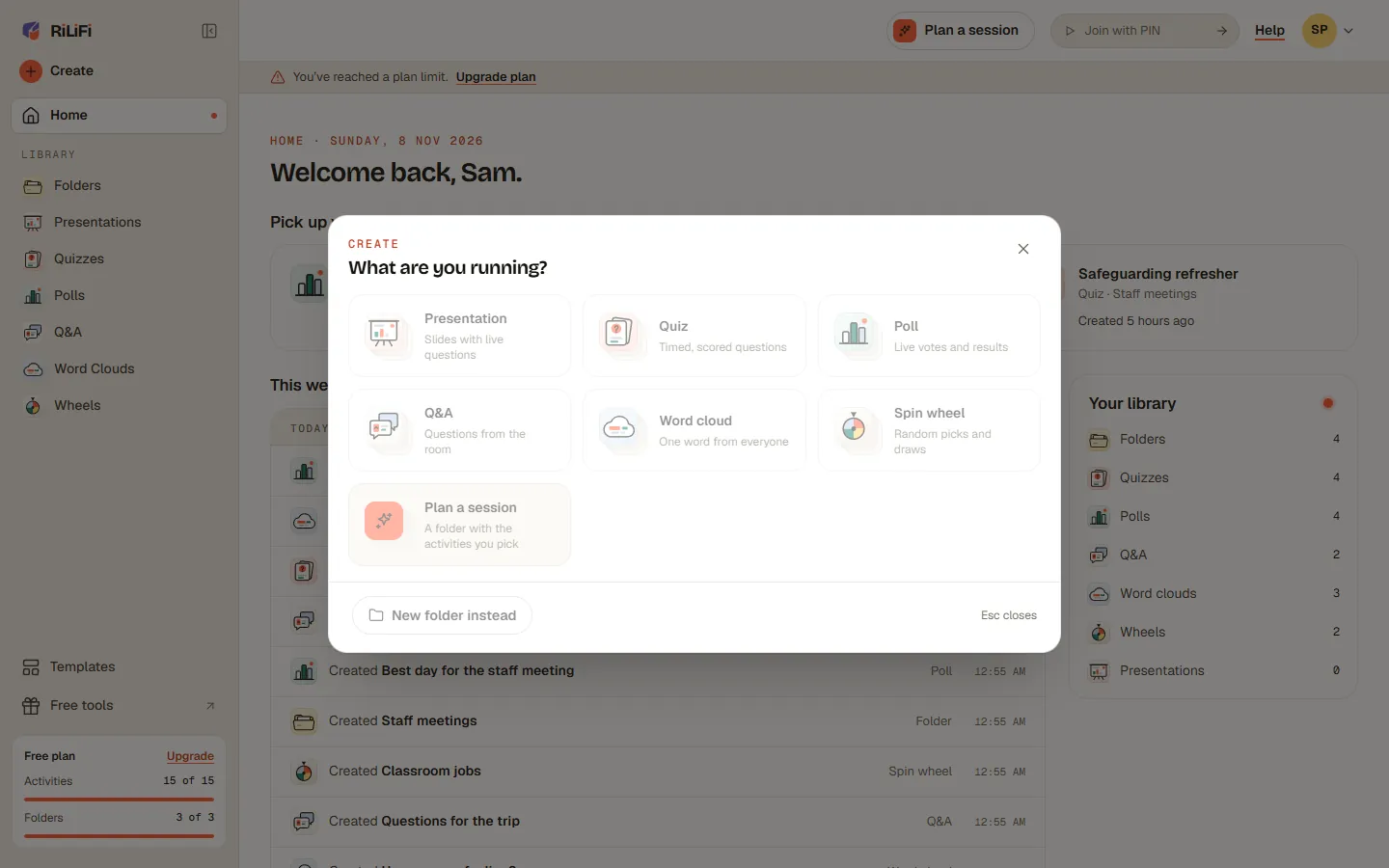
Activities, folders or bookmarksGrey create tiles and buttons with "You have reached your plan's limit for activities" (or folders, bookmarks). A strip: You've reached a plan limit.Delete items you no longer need, or press Upgrade plan.
Live sessionsGo live turns grey. On a quiz it reads Limit reached: "You have reached your session limit. Upgrade for more sessions."Upgrade. Rehearse still works.
People per sessionNew people see Limit reached on the join button. A presentation shows This presentation is full. Your host screen says your plan fits that number.Upgrade, then refresh the host screen. People already in can rejoin.
People per folder"You have reached your plan's limit for collaborators on this folder."Remove someone from Shared with, or upgrade.
AI credits"You don't have enough AI credits left this month for this."Wait for the next month, or upgrade.
A paid feature on FreeA lock, like Phone remote: on paid plans.Upgrade to Creator or higher.
A shared folder's ownerLimit Reached: "The folder owner, (name), is over their plan's limit", with OK.The folder owner upgrades or frees space.
CharactersA counter like 180/200, and the box stops or shows "Must not exceed" with the numberShorten the text.
The RiLiFi create sheet for Sam Patel on Free at 15 of 15 activities, with the activity tiles greyed out

Important:After a downgrade, nothing is deleted. Items over the new limit stay in your account. You can add more once you are back under the limit or upgrade.

Common questions

How many people can join a RiLiFi session?
It depends on the folder owner's plan: Free 100 · Creator 500 · Pro 1,000 · Enterprise 5,000+ people per live session.
Is there a limit on quiz questions in RiLiFi?
No. A RiLiFi quiz has no fixed limit on questions. Each question has 2 to 8 answers, and AI writes up to 20 questions in one request.
What files can I upload to RiLiFi?
Quizzes and presentations take JPEG, PNG or WebP pictures. A presentation can import a PDF up to 50 MB. AI drafts take one PDF up to 10 MB, or up to 3 photos.
Do deleted items count toward my RiLiFi limits?
No. Deleted activities, folders and bookmarks stop counting. Live sessions you already started stay in your lifetime total.
What happens to my content if I go over a RiLiFi limit?
Nothing is deleted. You keep everything, and you can add more once you are back under the limit or upgrade.
See every plan on the pricing page

Was this article helpful?

Screenshots show the RiLiFi app as of 8 Nov 2026, with demo content.

Still stuck? Raise a support case from your account, or email hello@rilifi.com with what you were trying to do.