RiLiFi
Start free

For tech communities, meetups and user groups

Connect, run and analyze your whole tech community.

Bring every city’s chapter leader into one RiLiFi organization. Build the meetup kit once and share it with every chapter. Leaders run it live with their own rooms, and your community team gets community analytics for every chapter in one dashboard.

  • Leaders join free
  • One kit for every city
  • Community analytics for every chapter
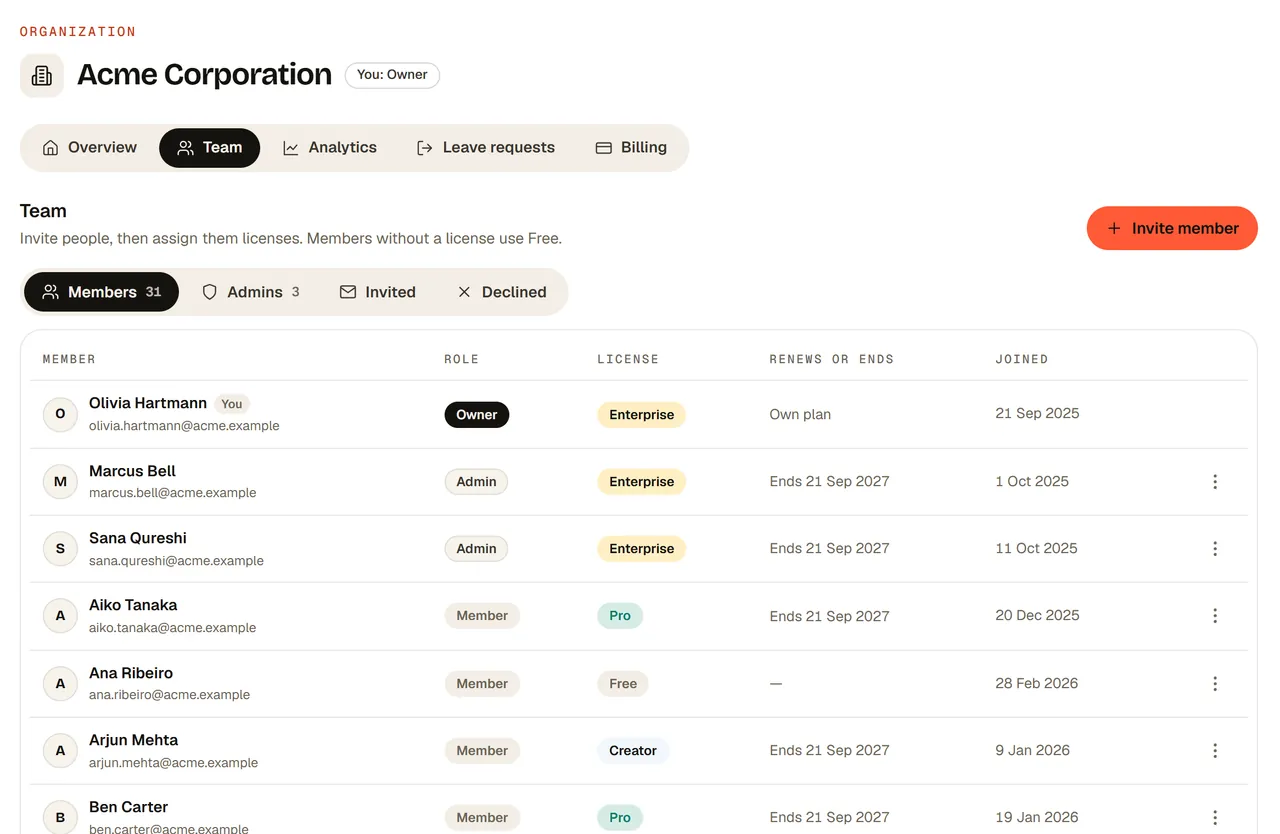
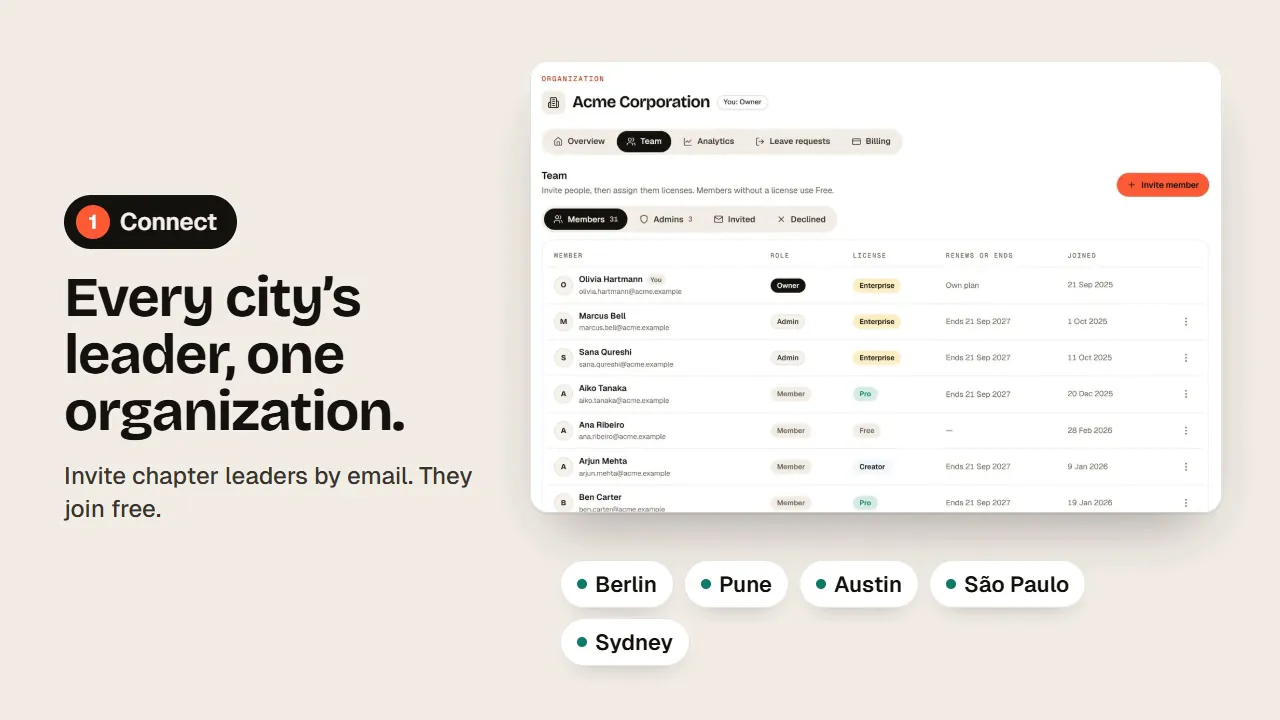
Step 1, Connect: the Team tab of a RiLiFi organization listing chapter leaders with their roles and licenses, next to city labels Berlin, Pune, Austin, São Paulo and Sydney
Free
for chapter leaders to join your organization
Unlimited
leaders you can share each kit with, on Enterprise
5,000+
people per session when leaders run your shared kit
3 views
of community analytics: Pulse, People and Activities
The Team tab of a RiLiFi organization with 31 members: the owner, two admins and members on Enterprise, Pro, Creator and Free, with the Invite member button
01 · Step 1 · Connect

Every city’s leader in one organization.

Invite each chapter leader by email. They join your organization on the free plan at no cost and keep their own account and content. Give your regional leads an Enterprise license and make them admins, so they can invite and support the leaders in their region. A person can belong to one organization at a time.

  • Invite by emailLeaders accept from the email and land in your Team tab.
  • Regional adminsAdmins invite leaders, assign licenses and handle leave requests.
  • Free for leadersMembers without a license use the free plan.
How organizations work →
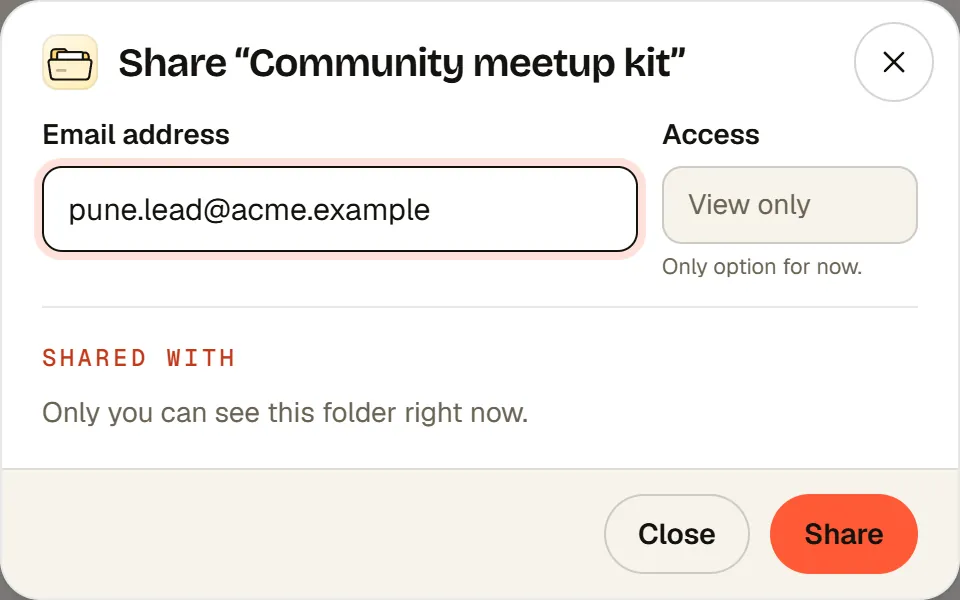
Sharing a folder called Community meetup kit with a chapter leader’s email, with access set to View only
02 · Step 2 · Create

Build the meetup kit once. Share it with every city.

Put your community deck, trivia quizzes, feedback polls and swag wheel in one folder, then share it by email with every chapter leader. On Enterprise, one folder can be shared with as many leaders as you have. They open the kit and run any of it live, but they can’t change it. Every city runs the same night, with the same questions and your brand.

  • One shared folderDecks, quizzes, polls, Q&As, word clouds and wheels together.
  • View only for leadersThey run the kit; only your team edits it.
  • Your brand on the deckYour colors and logo on presentations, on Creator, Pro and Enterprise.
  • Start from templatesReady-made quizzes and presentations to adapt.
How shared folders work →
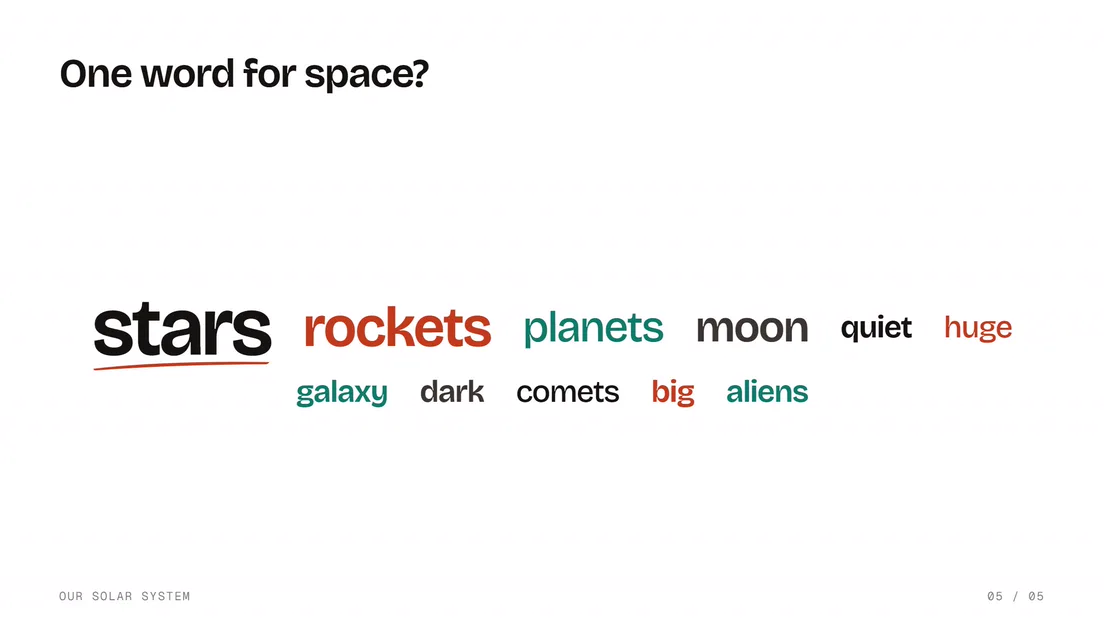
A live word cloud slide, One word for space?, with stars, rockets and planets the biggest words
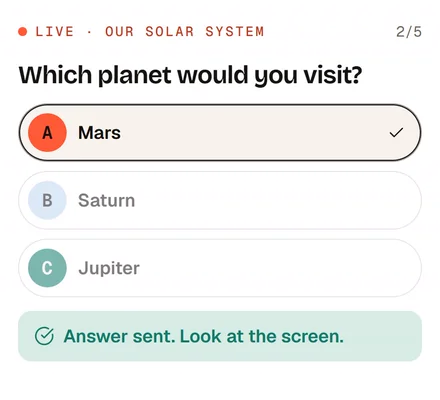
The poll on an audience member’s phone, Mars picked, with Answer sent. Look at the screen.
03 · Step 3 · Run

Every city runs the night live.

Each leader shows the join QR code and runs your kit with their own room, in person or hybrid. Sessions run from a shared folder use the folder owner’s plan, so on Enterprise a chapter can host 5,000+ people without a license of its own. Leaders can still build their own extras on the free plan.

  • Speaker Q&AQuestions from every seat, upvoted by the room.
  • Trivia roundPoints, speed and a leaderboard slide set to Combined.
  • Swag drawA wheel slide with up to 1,000 names, spun on the big screen.
  • FeedbackA rating scale and one open question before people leave.
See meetup formats →
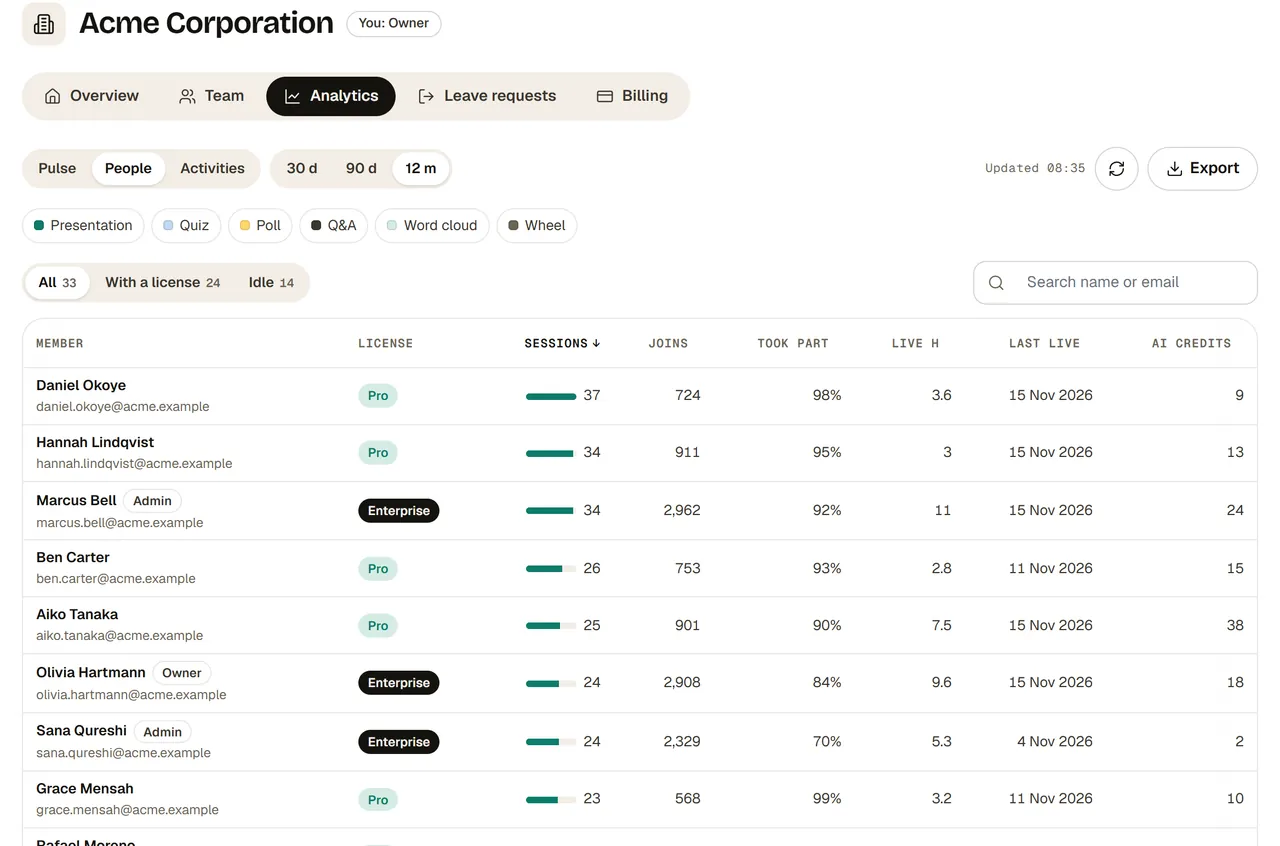
Organization analytics, People view: every member with their license, sessions, joins, took part, live hours, last live date and AI credits over 12 months
04 · Step 4 · Analytics

Community analytics for every chapter.

Your community dashboard shows the owner and admins the engagement metrics that matter: sessions, joins, the share who took part, active hosts and live hours, across every leader. Compare 30 days, 90 days or 12 months with the period before. People ranks each leader, so you see which cities are growing and which have gone quiet. Activities shows which formats get the most people answering. Results from your shared kit come back to your folder’s reports, and everything else shows as counts only.

  • Engagement metricsSessions, joins, took part and active hosts, against the period before.
  • Leader by leaderEach chapter’s activity, with a filter for idle leaders.
  • Community reportingExport people and sessions per day to CSV or Excel for your quarterly report.
How organization analytics works →
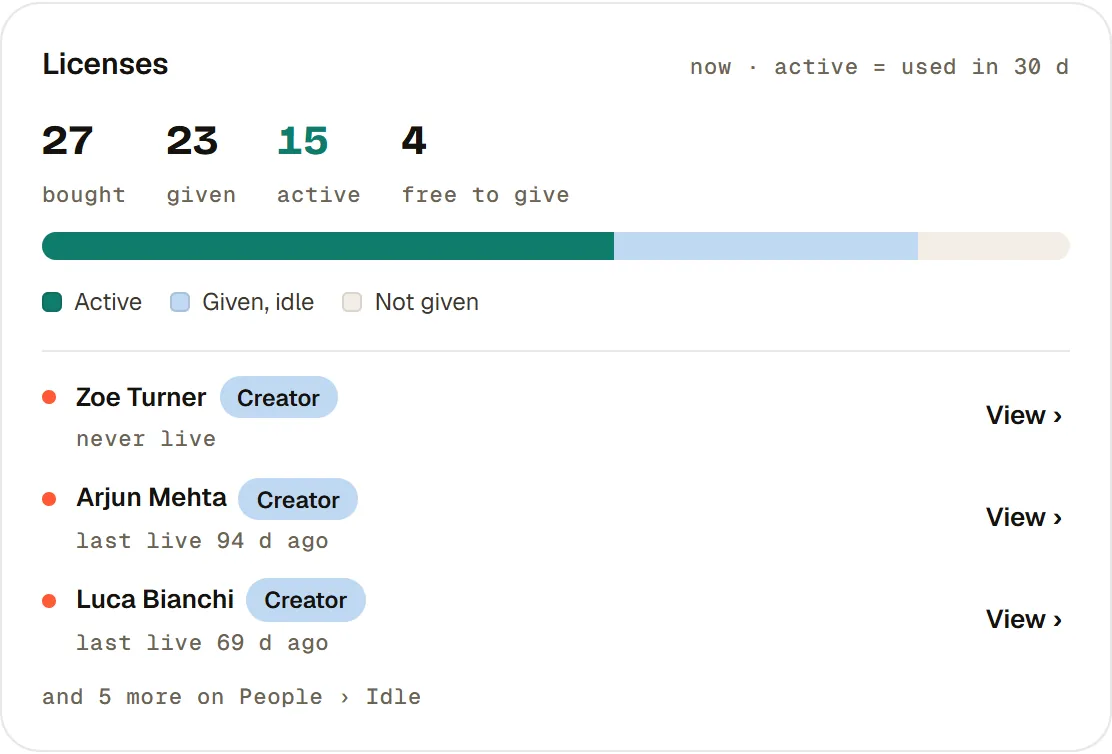
The Licenses card in organization analytics: 27 bought, 23 given, 15 active and 4 free to give, with the idle license holders listed
05 · Step 5 · Grow

Give your busiest chapters more.

Buy licenses only where a chapter needs its own. Creator gives a leader rooms of 500 for their own sessions, the phone remote and downloads. Pro adds Insights, and Enterprise lets them be an admin. The Licenses card shows which licenses are in use and which sit idle, so you can move one to a leader who will use it.

  • Licenses in any mixCreator, Pro and Enterprise, monthly or yearly.
  • Move a licenseWhen a leader steps down, the next one gets the same license.
  • Idle licensesHolders who haven’t gone live or made anything in 30 days.
See pricing →

Meetup formats

Tech meetup ideas for every chapter

Put a few formats in the shared kit and let each city pick. Each one runs from a single deck.

  • Lightning talks

    Four or five talks of five minutes each, with a big countdown on the screen. Close with a poll for the talk people want to hear more about.

  • Demo night

    Members show what they built. Each demo gets two minutes of upvoted questions, and the room votes for a favorite at the end.

  • Ask me anything

    One guest and an hour of questions. Q&A runs the whole time, so the room decides what gets asked.

  • Certification study group

    Work through one exam topic with quiz slides, then a leaderboard. People see where they stand before the real exam.

  • Hack night

    Split the room into random teams, give each a name, and end with two-minute demos and a vote.

  • Migration stories

    Two members share a project that went wrong and how they fixed it. Open with a word cloud: “Your biggest blocker this year?”

  • Trivia social

    A lighter month: three rounds about your stack and tech history, with a leaderboard and swag for the top three.

  • Hands-on workshop

    Quick polls check the room’s progress (“Done with step 3?”) and Q&A collects the blockers as they happen.

  • Planning night

    Once a year, a ranking slide lets members order next year’s topics, and an open question collects speaker offers.

Run of show

The meetup kit, slide by slide

A 90-minute night in one interactive presentation. Each run counts as one live session; a leader’s own decks on the free plan include 50.

  • 0:00 Doors open

    A word cloud on the screen: “What are you working on this month?” People join with the QR code while they get a drink.

  • 0:10 Welcome

    Two quick polls: who is here for the first time, and which topic the group wants next.

  • 0:15 Main talk

    Q&A stays open for the whole talk. People ask and upvote from their seats, and the speaker answers the top questions at the end.

  • 1:00 Trivia round

    Ten quiz slides about the talk or your stack, then a Leaderboard slide set to Combined. About ten minutes.

  • 1:10 Swag draw

    A wheel slide with everyone’s names, spun on the big screen.

  • 1:15 Feedback

    A rating scale for the talk and one open question, answered before anyone leaves.

  • 1:20 Networking

    A thank-you slide with the next date and the speakers’ links.

FAQ

Questions from community teams

How can a company manage tech meetups across many cities?
Put every chapter leader in one RiLiFi organization, build the meetup kit once in a folder and share it with every leader. Each city runs the kit live with its own room. Community analytics on Enterprise shows the owner and admins every leader’s sessions, joins and the share who took part.
Can we share one meetup deck with every chapter?
Yes. Share the folder by email, view only. Leaders open it and run any activity live, and only your team can change it. On Enterprise a folder can be shared with unlimited people, and every session run from it uses your plan’s limits.
Is RiLiFi free for chapter leaders?
Yes. Leaders join your organization on the free plan at no cost. Running your shared kit uses your plan. For their own decks, the free plan takes 100 people per session and includes 50 live sessions in total.
What community analytics does RiLiFi show?
On Enterprise, the owner and admins see sessions, joins, the share who took part, active hosts, live hours and AI credits for every leader. Pick 30 days, 90 days or 12 months, and each number is compared with the period before. It shows counts only, never attendee answers or names from leaders’ own sessions, and it exports to CSV or Excel.
How do you measure community engagement across chapters?
Track four numbers per chapter. Sessions show how often it meets, joins show how many people come, took part shows how many of them answer or ask, and active hosts show how many leaders run sessions. In RiLiFi’s community analytics these sit side by side for every leader, so a city that has gone quiet shows up early.
What are good tech meetup ideas?
Rotate formats: lightning talks, demo nights, ask-me-anything sessions, study groups, hack nights, workshops and a trivia social. Each one runs from one interactive presentation.
What should a meetup feedback poll ask?
Keep it to three questions: a 1 to 5 rating of the talk, a ranking of next topics and one open question. For the open one, try “What should we change?”. Ask on the screen before networking starts.
Can remote attendees take part in a hybrid meetup?
Yes. Share your screen in Zoom or Microsoft Teams with the join QR code. Remote and in-room attendees answer the same slides, and their answers appear together.
Do attendees need to download an app or sign up?
No. Attendees scan the QR code, or go to the join page and type the PIN, in any phone or laptop browser.

For community teams

Connect your whole community.

Invite your chapter leaders, share the first meetup kit and see every city’s next meetup in one place.

Start freeSee pricing

Leaders join free