RiLiFi
Start free

Audience response system

Audience response system.

An audience response system lets a presenter ask the room a question and see everyone's answers live on the screen. RiLiFi is an audience response system that runs on people's own phones: they join with a PIN, QR code or link, with no clickers, no app and no account.

  • No clickers or app
  • Free for 100 people per session
  • 10 ways to ask the room
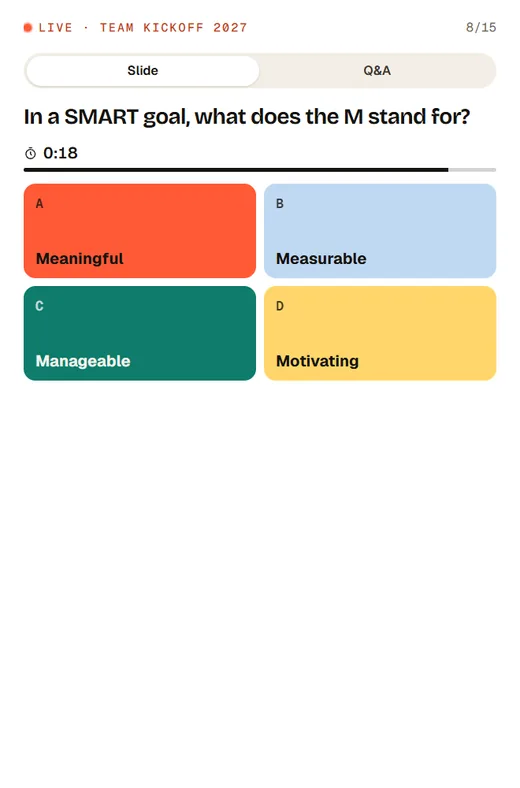
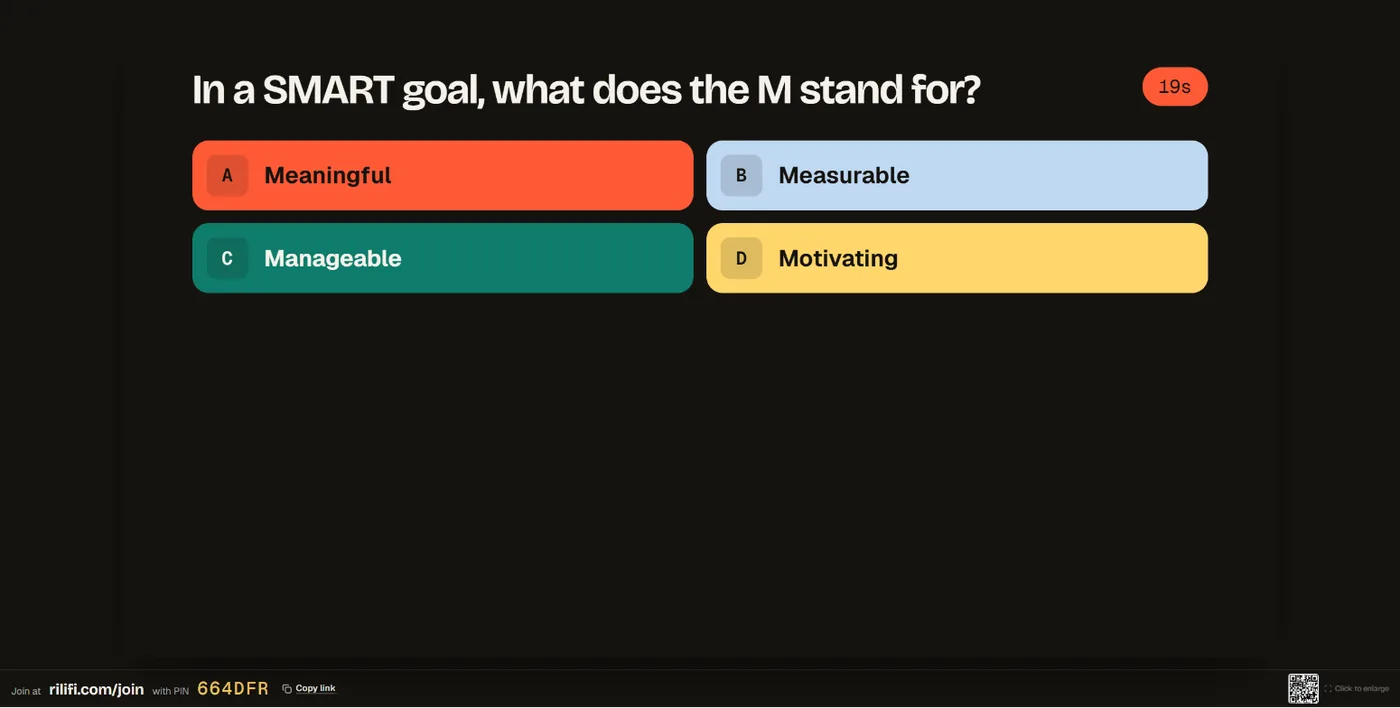
The presenter screen showing a timed quiz question with a team photo above the four answers, and the join link and PIN in the footerA quiz question on an audience member’s phone, with four coloured answers and a timer
The presenter screen showing a timed quiz question with a team photo above the four answers, and the join link and PIN in the footer
01

What an audience response system does.

You put a question on the screen. Everyone answers at the same time, and the results build live in front of the room. Nobody has to raise a hand, so you hear from the quiet people too, and you see straight away what the room thinks or knows.

  • AskA poll, a quiz question, a word cloud, a rating or a question for Q&A.
  • Everyone answersEach person answers on their own phone, at the same time.
  • See it liveBars, word clouds and leaderboards update on the screen as answers arrive.
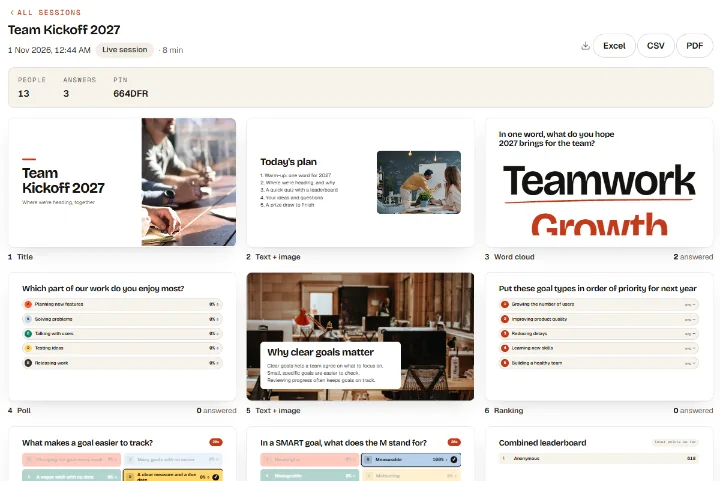
A RiLiFi presentation report: people, answers and every slide as it was shown, with Excel, CSV and PDF downloads
02

How RiLiFi works.

Build a presentation with 13 slide types, 10 of them interactive, or bring your own slides as a PDF. When you present, the screen shows "Join at rilifi.com/join", a PIN and a QR code. People answer on their phones and the results appear on your screen.

  • Join by PIN, QR or linkPeople open rilifi.com/join in the phone browser. No app and no account.
  • Question typesPoll, word cloud, open text, rating scale, ranking, pin on image, Q&A, quiz question, leaderboard and spin wheel.
  • ReportsEvery session gets a report. Excel, CSV and PDF downloads are on paid plans.
A quiz question on an audience member’s phone, with four coloured answers and a timer
03

Plans and limits.

Every slide type is on every plan, including Free. Plans differ in how many people can join one session, and in extras such as reports downloads and the phone remote. Pay monthly and cancel any time.

  • Free: 100 people$0, 50 live sessions in total, 15 saved activities.
  • Creator: 500 people$7 a month. Brand kit and phone remote.
  • Pro: 1,000 people$12 a month. Unlimited sessions and login-only joining.
  • Enterprise: 5,000+ people$25 a month per license, for the largest events.

In three steps

Run your first audience response session

  1. 01

    Build or bring your slides

    Add questions between your own slides, or bring your deck as a PDF and add questions between the pages.

  2. 02

    Present and share the PIN

    The screen shows the join link, PIN and QR code. People join on their phones in a few seconds.

  3. 03

    Watch the answers arrive

    Results build live. Show them or hide them, close voting, then move on. The report is ready when you finish.

Clickers or phones

Clickers vs phone-based audience response systems

Both do the same job. The difference is what the audience holds and what you have to set up.

Clickers (handsets)Phone-based (like RiLiFi)
CostA handset for each person, plus a receiver and software, usually bought up front.People use their own phones. Free for 100 people per session; paid plans from $7 a month.
SetupHand out handsets, pair them with the receiver, collect them at the end.Show the PIN or QR code. People join in the phone browser.
Question typesMostly multiple choice and numbers.Polls, quizzes, word clouds, open text, ratings, ranking, pin on image and Q&A.
AnonymityAnonymous unless handsets are registered to people.Polls, word clouds and ratings show totals on the screen, not who answered. Names in reports are on paid plans.
ResultsShown in the clicker software; reports depend on the system.Live on the presenter screen, with a report for every session.
Where it worksIn the room, within range of the receiver.Anywhere with internet: in the room, hybrid or online.

Clickers still make sense where phones are not allowed or there is no reliable internet.

FAQ

Audience response system questions

What is an audience response system?
A tool that lets a presenter ask the audience a question and collect everyone’s answers at once, with the results shown live on the screen. Older systems use handheld clickers; web-based systems like RiLiFi use people’s phones.
Do people need clickers or an app?
No. People open rilifi.com/join in the browser on their phone, then type the PIN, scan the QR code or follow a link. There is no app to install and no account to create.
How many people can answer at once?
Up to 100 people per session on the free plan, 500 on Creator, 1,000 on Pro and 5,000+ on Enterprise.
Is it anonymous?
On the screen, polls, word clouds, ratings and rankings show totals, not who answered. A quiz leaderboard shows the names players choose. Names in results and report downloads are on paid plans; on the free plan they are blurred.
Can I use it with my PowerPoint slides?
Yes. Download your deck as a PDF and bring it into RiLiFi. Each page becomes a slide, and you add polls, quizzes and Q&A between them.
What does it cost?
RiLiFi is free for 100 people per session, with every slide type. Paid plans start at $7 a month for 500 people, billed monthly, and you can cancel any time.

Try it today

Ask your next room a question.

Free for 100 people per session, with every slide type. Your audience needs only a phone.